
I recently rebuilt my entire website myself, without a developer, SEO expert, AEO specialist, or design team.

A few years ago, that would have meant staying within the limits of what I already knew how to do or bringing in help for the parts I didn’t.

With AI, I could take the website content strategy I had mapped out and execute across copy, SEO, design, and code without stopping every time I hit the edge of my own skill set.

AI gave me more room to experiment with the site than I had before. I could rethink an entire page, test a different structure, build something I couldn’t code on my own, dig into a technical SEO problem, or keep pushing an idea until it felt right.

Somewhere in the middle of having all those options, I realized the hardest part was knowing which decisions would improve the user experience, strengthen search visibility, and make the site easier to discover through search engines and LLMs.

What Is a Website Content Strategy

A website content strategy is the plan for what your website needs to communicate, how that information is organized, what each page needs to accomplish, and how people will find and move through the content.

It starts before you write any copy.

You can have a beautifully written website and still make it difficult for someone to understand what you do, find the information they need, or know where to go next.

Rewriting a headline will not fix a confusing site structure, and stronger calls to action will not do much if the right proof is buried three pages deep.

The strategy behind the content is what connects those decisions.

Positioning determines what you want to be known for. Information hierarchy determines what gets priority. Site architecture and page purpose determine where information belongs. Search intent and SEO influence how people discover it. Proof gives them a reason to believe what you are saying, and conversion paths give them somewhere logical to go next.

On my own site, that meant deciding which work deserved a dedicated case study, what belonged on the broader portfolio page, which topics deserved their own content, and where someone needed proof before I ever started rewriting the copy.

For example, my My Work page needed to show the breadth of my experience quickly, while an individual case study needed enough room to explain the problem, the strategic decisions I made, the execution, and the outcome. Giving those pages different jobs helped me decide what belonged on each instead of repeating the same information across both.

When I rebuilt the site, I wasn’t simply rewriting pages or giving the design a refresh. I was looking at how all of those pieces worked together and where the experience was breaking down.

AI could help me execute the changes once I knew what I wanted to solve, but deciding what needed to change in the first place was the website content strategy.

Why Website Content Strategy Matters More Now That Content Is Easier to Create

That separation between strategy and execution became much more important once execution got easier.

Website content strategy matters more now because AI has reduced many of the barriers to building and optimizing a website. You can execute more ideas faster, but that makes deciding which ideas are worth pursuing more important.

Copy that once took hours to develop can be explored in minutes. You can research competitors, test page structures, troubleshoot code, create visual concepts, dig into SEO opportunities, and generate new ideas without bringing in a different specialist at every stage.

I experienced that throughout my own rebuild.

If I wanted to add a section, I could create it. If I wanted a different way to showcase my work, I could build it. If I found an SEO opportunity, I could explore how it might fit into the site before deciding whether it belonged there.

The ability to execute wasn’t the constraint. Deciding which possibilities supported the website I was trying to build was much harder.

A new page might create another opportunity to rank, but it could also compete with content already on the site. More copy might answer another question, but it could also bury the information someone came to find. A new feature might improve the user experience, or it could distract from the action I want someone to take.

AI made all of those options easier to produce, but it didn’t make every option worth pursuing.

Website content strategy gave me a way to make those calls based on what the audience needed, how I wanted people to move through the site, what I wanted to be discovered for, and what each piece of content was supposed to accomplish.

How I Audited My Existing Website Before Rebuilding It
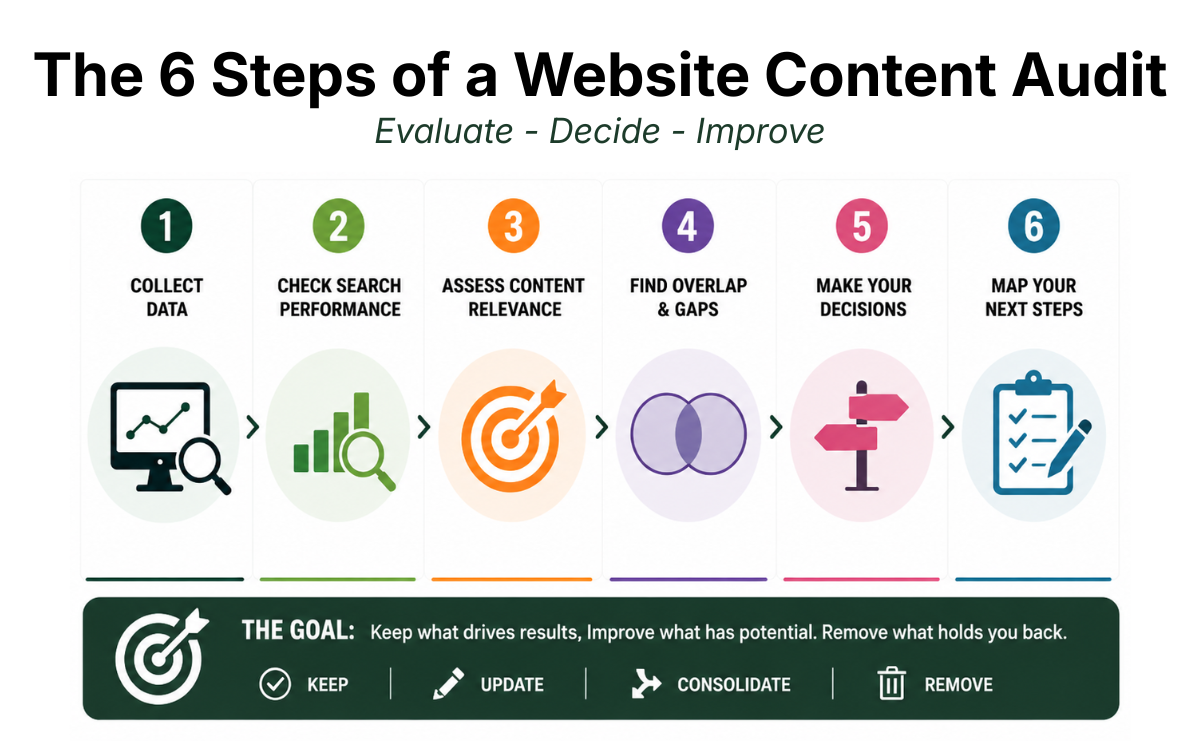
6 Step of a Website Content Strategy Audit

Once I knew I needed a clearer reason for what stayed on the site, I had to figure out what I was starting with.

A website content audit evaluates the content already on your site to determine what still has value, what needs to change, what can be consolidated, and what no longer supports where the website is going.

That last part was particularly important for me.

Christina Ink was originally built around my Amazon listing optimization agency. The site was designed to attract brands looking for Amazon detail page and brand strategy services, so naturally, the pages, blog content, keywords, and positioning reflected that business.

My career had moved on, but much of my website hadn’t.

I now work more broadly across marketing and content strategy, and I needed the site to show that.

Someone landing on Christina Ink needed to be able to see the range of work I had done, how I approached marketing problems, and the strategy behind the execution.

That meant I wasn’t approaching the audit with the assumption that everything valuable needed to be preserved. Some content had done exactly what it was created to do. It simply wasn’t supporting where I wanted to go next.

At the same time, deleting years of content without understanding what it was doing in search would have been a pretty reckless way to start a rebuild.

What Should a Website Content Audit Include

A website content audit should look at how your content is performing and whether it still supports what the website needs to accomplish.

I started with Google Search Console to see which pages were earning impressions and clicks, what queries they were appearing for, and where the site already had search visibility.

Traffic alone wasn’t enough to make a decision. A page with few clicks could still have search visibility, while overlapping pages could be competing for the same intent.

This is also where the audit became more than an SEO exercise. I needed to know whether each page still represented expertise I wanted associated with my name.

I looked at whether the information was current, whether someone visiting the site today still had a reason to need it, whether it supported the broader marketing experience I wanted to showcase, and whether another page was already doing the same job better.

The Amazon content made those decisions particularly interesting.

Google had years of information connecting Christina Ink with Amazon listing optimization. That existing visibility had value, but keeping an entire website positioned around Amazon because search engines already understood it would have meant optimizing for a business I was no longer trying to build.

The SEO data showed me what the old site had accumulated. The website content strategy helped me decide whether that value still belonged in the new one.

How to Decide What Website Content to Keep Update Consolidate or Remove

Once I understood both sides of the site, every piece of content needed a decision.

Keep content that is still relevant, useful, and serving a clear purpose

Update content that has value but no longer reflects your positioning, current expertise, or the search opportunity

Consolidate content when multiple pages are competing to do essentially the same job

Remove content that no longer serves the audience, your positioning, or a meaningful search purpose

In practice, my own audit leaned heavily toward the last option.

I wasn’t trying to turn an Amazon agency website into a slightly broader version of itself. I was repositioning Christina Ink around the work I do now, which meant very little of the old website ultimately made sense to carry forward as it was.

My Amazon experience didn’t suddenly become irrelevant. It is still part of my marketing background and includes work worth showing. What changed was the role I wanted it to play.

Instead of allowing one part of my career to define the entire website, I could preserve the strongest examples of that work in my portfolio while rebuilding the site around a much broader picture of what I could do as a marketer.

That also meant being careful about how I removed old content.

Before changing URLs, consolidating pages, or redirecting something, I wanted to understand whether it had existing search visibility and what I would potentially be giving up.

What the Content Audit Taught Me About Starting Over

The biggest lesson from auditing my old site was that existing value and future value are not always the same thing.

I already knew that removing a page with search visibility can mean giving up rankings and traffic that took time to build.

What became much clearer during the rebuild was that preserving SEO value at all costs can create its own problem when that value is attached to a direction you have already outgrown.

AI made it much easier to explore those tradeoffs. I could investigate what could happen if I removed a page, changed a URL, redirected old content, or rebuilt something around a different search intent.

Google Search Console showed me what the old site was still being discovered for, while AI helped me work through the implications of different options.
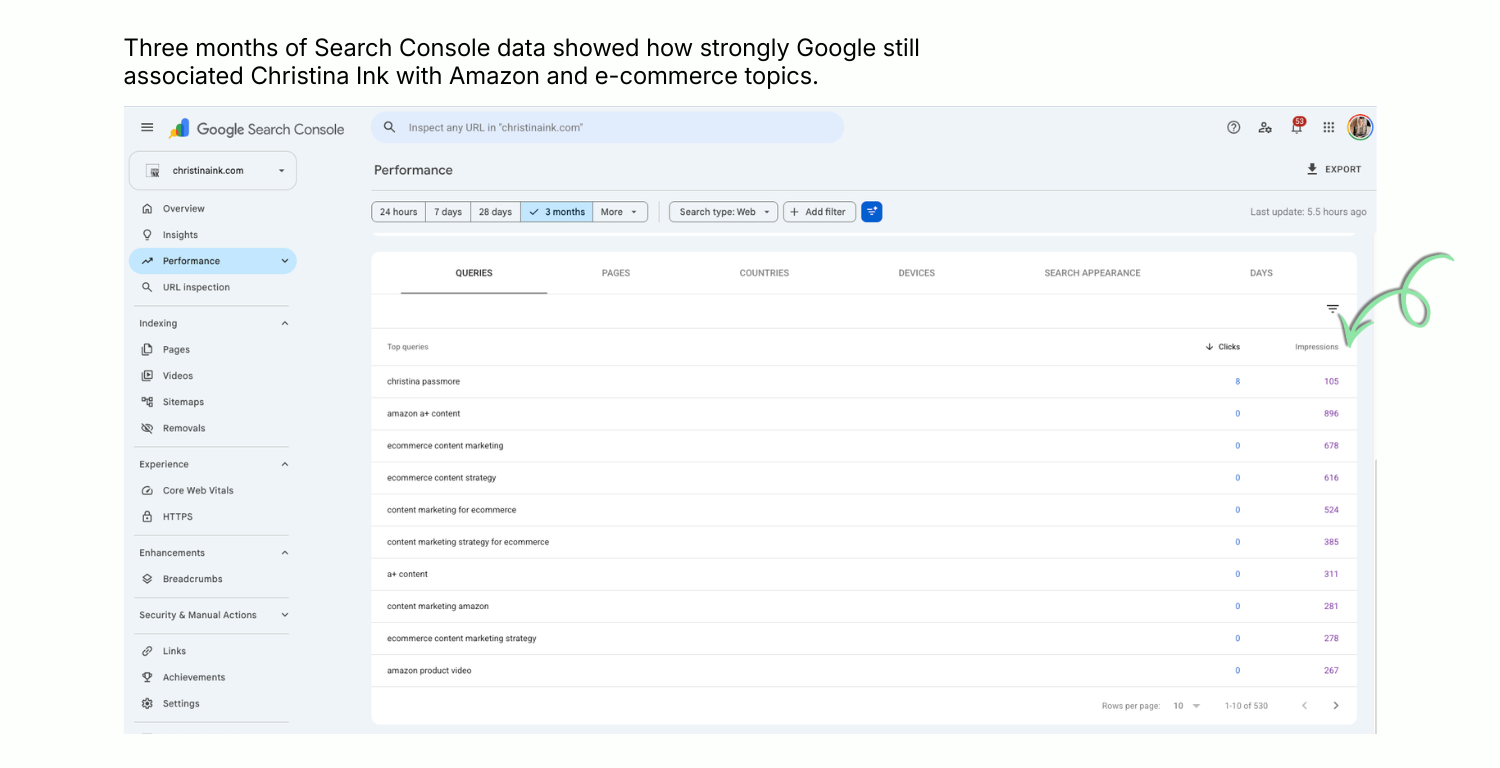
Google Search Console queries showing Christina Ink ranking for Amazon and ecommerce searches Fig. 1.0 Three months of Search Console data showed how strongly Google still associated Christina Ink with Amazon and e-commerce topics.

Fig. 1.0 Three months of Search Console data showed how strongly Google still associated Christina Ink with Amazon and e-commerce topics.

But I wasn’t going to preserve an Amazon listing optimization agency simply because Google still understood Christina Ink as one.

I had to be willing to give some things up.

Very little of the old website ultimately survived the rebuild. I kept the strongest examples of work that still demonstrated what I could do as a marketer, but I stopped allowing the site’s history to dictate its future direction.

SEO gives us good reasons to protect existing value. This rebuild reminded me that the value still needs to support where the website is going.

Sometimes the strategic decision is to accept losing visibility for something you no longer want to be found for so you can start building visibility for what comes next.
How I Decided What Content My Website Actually Needed

Once I stripped away most of the old site, I had a different problem. I was essentially starting with a blank slate.

I could have looked at other marketing portfolios, made a list of the pages they all seemed to have, and built my version of the same thing. Instead, I worked backwards from what I needed Christina Ink to do.

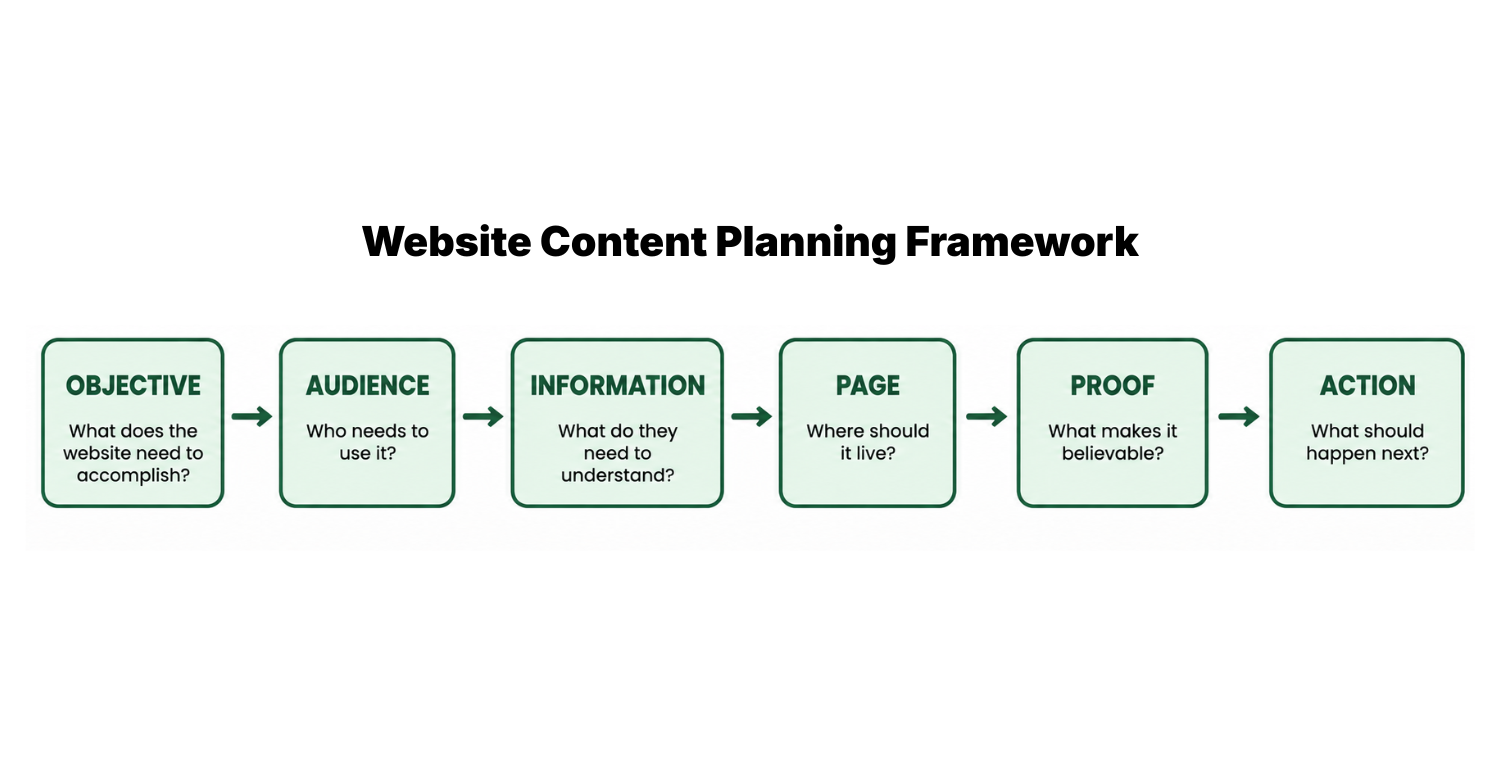
Six-step website content planning framework from objective through action

Start With the Objective

I needed Christina Ink to support where I wanted to go next in my career.

That meant showing the strategy behind the work I had done across different marketing campaigns, content, SEO, digital e-commerce, and other channels.

That objective immediately ruled some things in and others out.

A long list of everything I had ever worked on wasn’t useful. I needed enough range to show breadth, but enough depth that someone could see how I actually think.

Map What Your Audience Needs to See

From there, I worked out what someone would need to see to believe the positioning.

Saying I understand strategy is easy. Showing the decisions behind a project is proof.

Saying I can work across channels is easy. Showing work across go-to-market launches, websites, email, social, e-commerce, SEO, and campaigns makes the point without asking someone to take my word for it.

That helped me identify the information the site needed before I decided where any of it should live.

Decide Which Pages Your Website Needs

Only then did I start mapping pages.

Some information needed a permanent home. My broader body of work needed a portfolio. Projects where the thinking mattered as much as the final deliverable needed case studies. My own marketing perspective needed the blog. My background needed enough context to connect the dots without turning the About page into my resume.

This was also where I started seeing the difference between having something to say and needing another page to say it on.

If an idea could strengthen an existing page, it didn’t automatically need its own URL. If a topic deserved a page, I needed to be able to explain what job that page would do that another page couldn’t.

Add Proof Before Adding More Copy

One of the bigger changes I made was thinking about proof earlier.

Instead of writing a claim and then looking for something to support it, I could start with the evidence I already had and build around it.

That meant case studies, screenshots, examples of actual work, results where I had them, and enough context to show what my role was.

For a portfolio site, another paragraph telling someone I’m strategic is never going to be as convincing as showing them a strategic decision I actually made.

Decide What Happens Next

The final question for every important page was what someone should be able to do next.

Sometimes that meant moving from a portfolio overview into a case study. Someone finding an article through search might need a path into related expertise or work. Someone evaluating me professionally might want to move from understanding what I do to seeing evidence that I can do it.

That gave me a way to connect pages instead of treating the website as a collection of individual destinations.

AI was useful throughout this process for pressure-testing the structure and showing me possibilities I hadn’t considered. But by this point in the rebuild, I had learned not to confuse another possible idea with a missing piece of the strategy.

The framework gave me a much simpler test. If I couldn’t connect a piece of content back to an objective, an audience need, a page purpose, proof, or a logical next action, I had a pretty good reason not to build it.

How I Structured My Website Content Around SEO and UX

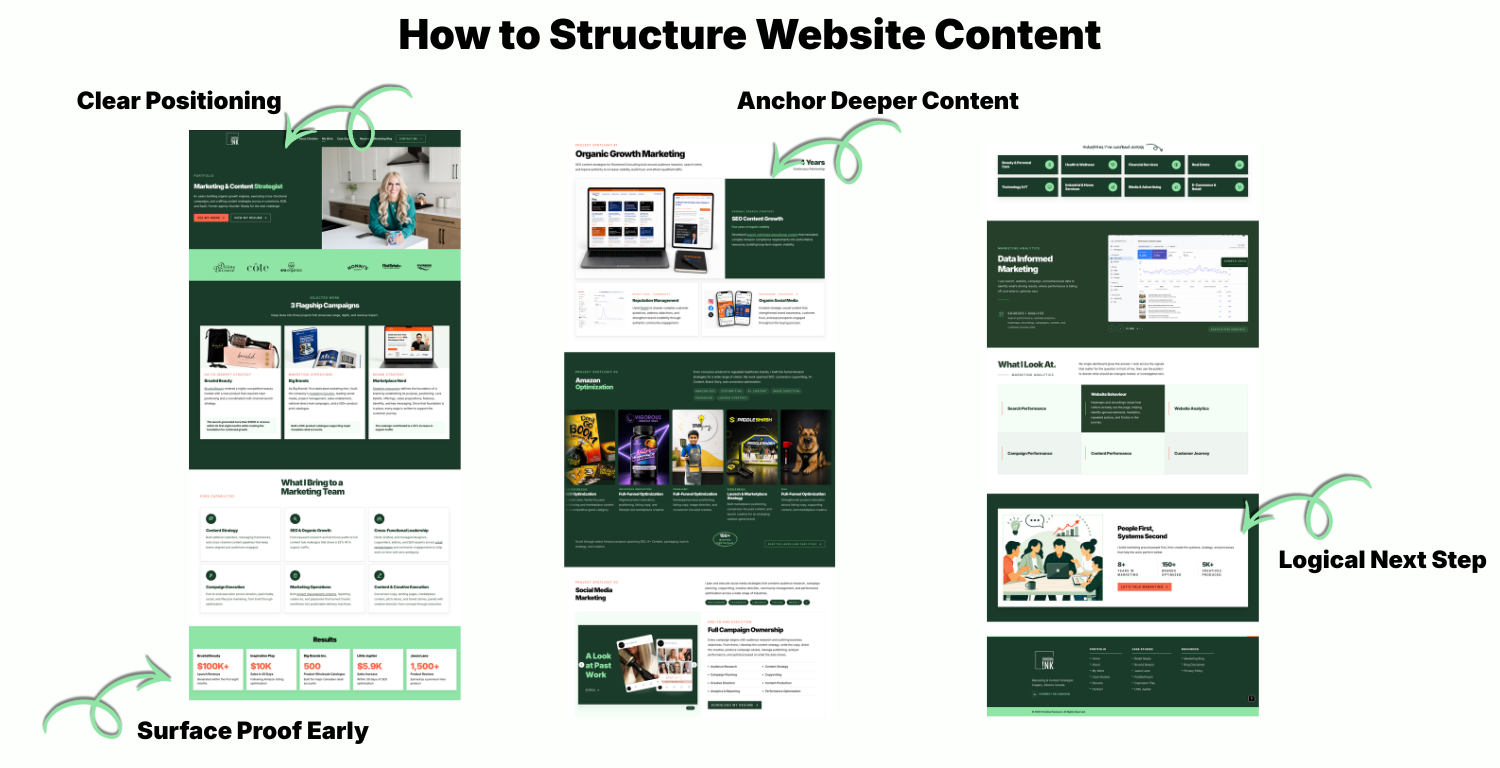
Christina Ink website content structure showing relationships between key pages

Once I knew which pages the website needed, the next question was how they should fit together.

Website content structure is how pages and information are organized so people can understand what a website offers, find what they need, and move logically between related content.

For Christina Ink, I didn’t want every page competing to tell my entire story. I wanted each part of the site to do a different job while still contributing to the same positioning.

That led to a fairly simple structure.

Give Different Types of Content Different Jobs

My Work page became the overview. Someone who wants to quickly understand the range of work I’ve done can see it without committing to a full case study.

The individual case studies go deeper. They give me room to show the problem, my thinking, the work itself, and the outcome rather than squeezing all of that context into a portfolio grid.

The Marketing Blog gives me somewhere to demonstrate how I think about marketing topics and target search queries that would make no sense as permanent portfolio pages.

The About page connects my background to the work without asking the homepage to carry my entire career story.

And the homepage acts as the front door. Its job is to give someone enough context to understand who I am, what I do, and which part of the site makes sense for them to explore next.

Separating those jobs helped me cut a surprising amount of content. If something was already being handled properly somewhere else, I didn’t need to explain it again just because I had space.

Structure Content Around How People Look for It

I also had to think beyond someone arriving on the homepage and politely clicking through the navigation in the order I intended.

That isn’t how search works.

Someone could enter through this article. Another person could land directly on a case study. A hiring manager might go straight to my Work page. Someone searching for a specific marketing problem could meet Christina Ink for the first time several layers into the site.

Every important page needed enough context to make sense as an entry point, while internal links created paths into related content.

Google uses links to discover pages and understand their relevance, which gave me another reason to treat internal linking as part of the site’s structure rather than something to add afterward.

That meant connecting pages where the relationship was useful.

A marketing article can lead to relevant work. A portfolio overview can lead into deeper case studies. A case study can provide context about a capability without requiring me to repeat the same explanation everywhere else.

The links have a reason to exist.

Keep Important Content Close to the Surface

The structure also forced me to think about how many steps it took to reach the content I cared about most.

If one of the main reasons for rebuilding Christina Ink was to showcase my work, burying the strongest examples several clicks below the homepage would make very little sense.

So I kept the site’s main content areas close to the top of the architecture and used deeper pages when the subject actually required more depth.

What matters is that the hierarchy reflects the priorities of the website.

My work is prominent because demonstrating what I can do is a primary goal. Case studies sit beneath it because they provide deeper proof. Articles have their own section because they serve discovery and demonstrate expertise in a different way.

Use Search Intent to Decide When a Topic Needs Its Own Page

One of the harder structural decisions was knowing when something deserved its own URL.

I didn’t want to create separate pages for every service, skill, or marketing term I could potentially rank for. That would have recreated the problem I was trying to solve, only with better SEO research behind it.

A topic needed a distinct enough purpose or search intent to justify standing on its own.

If two pages would essentially answer the same question for the same person, splitting them apart could create unnecessary overlap and potentially make them compete for similar queries. If someone searching for one topic needed something meaningfully different, a dedicated page became easier to justify.

That gave SEO a role in the architecture without allowing keywords to dictate the architecture.

I also wanted a structure that could accommodate new case studies and articles without requiring another top-level section every time the site grew.

How I Built SEO Into My Website Rebuild

Once I had the content and structure mapped out, I could get more specific about how I wanted people to find it.

Building SEO into a website rebuild means using search data and search intent to influence what you create, how you structure it, and how pages connect instead of trying to optimize everything after the site is built.

For me, that meant looking at what Google already knew about Christina Ink, where I had a realistic opportunity to compete, and what I needed to change without creating unnecessary technical problems along the way.

I Used Search Data to Find Real Opportunities

I started with Google Search Console to understand which pages were earning impressions and clicks, what queries I was appearing for, and what Google already associated with my site.

Then I looked forward.

I didn’t want to choose new keywords based on search volume alone. I looked at the actual SERP to see who was ranking, what the search intent looked like, whether smaller sites were competing alongside high-authority domains, and whether I had something useful to contribute that the existing results didn’t.

This article is one example.

I chose website content strategy because there was search demand and the SERP wasn’t completely dominated by sites I had no realistic chance of competing with. But ranking potential wasn’t enough.

I had also just rebuilt my own website and could bring first-hand experience to a topic that was largely being covered through general advice. That became an important part of my keyword research.

A keyword can have search opportunity and still not be a good content opportunity if I have nothing new to add to the results.

I Built Search Intent Into the Content

Once I chose a topic, I looked at the questions and subtopics Google consistently associated with it.

For website content strategy, people were also looking for information about content audits, website content planning, site structure, and how to organize website content. Those queries helped me understand what someone searching the broader topic would reasonably expect the article to answer.

I didn’t use them to copy the outlines already ranking. Instead, I built sections around the relevant search intent and then looked for where my own experience could make the answer more useful.

You can see that approach throughout this article.

A question such as What Is a Website Content Strategy gets a direct answer before I expand on it. The content audit section answers a different query and can still make sense on its own. Then my own rebuild provides the examples and context behind the advice.

That led me to a simple test while I was writing:

Could anyone have written this?

If the answer was yes, I needed a better example, a stronger point of view, or more first-hand evidence.

I used a similar approach for AEO. Clear headings, direct answers, descriptive language, and sections that can stand on their own make the content easier to understand outside the context of the full article.

That matters more as the search experience changes. Pew Research Center found that when a Google AI summary appeared, users clicked a traditional search result in just 8% of visits, compared with 15% when no AI summary appeared. Only 1% clicked a source directly from the AI summary.

I Protected the Technical SEO During the Rebuild

The other side of SEO had nothing to do with writing.

I was replacing a website that had existed for years, which meant old URLs, redirects, canonicals, internal links, indexing, and my sitemap all needed attention.

I reviewed canonical URLs, submitted the new sitemap, checked indexing, cleaned up blog categories and internal links, and made sure the heading structure of the new pages matched what I intended rather than relying on how the WordPress template happened to display them.

It wasn’t the visible part of the rebuild, but it mattered just as much.

SEO wasn’t something I added once the new Christina Ink was finished. It influenced what I kept, what I created, how I wrote it, and how I made the transition from the old site to the new one.

What AI Did Well and Badly During My Website Rebuild

By this point, AI had touched almost every part of the rebuild. I used it for copy, code, SEO research, troubleshooting, design ideas, content structure, and plenty of smaller problems I probably would have handed off or worked around a few years ago.

Some of it worked incredibly well. Some of it created more work.

Where AI Made Me Better and Faster

AI was most useful when I understood the outcome I wanted but didn’t necessarily have all of the technical skills to get there on my own.

Code was probably the clearest example.

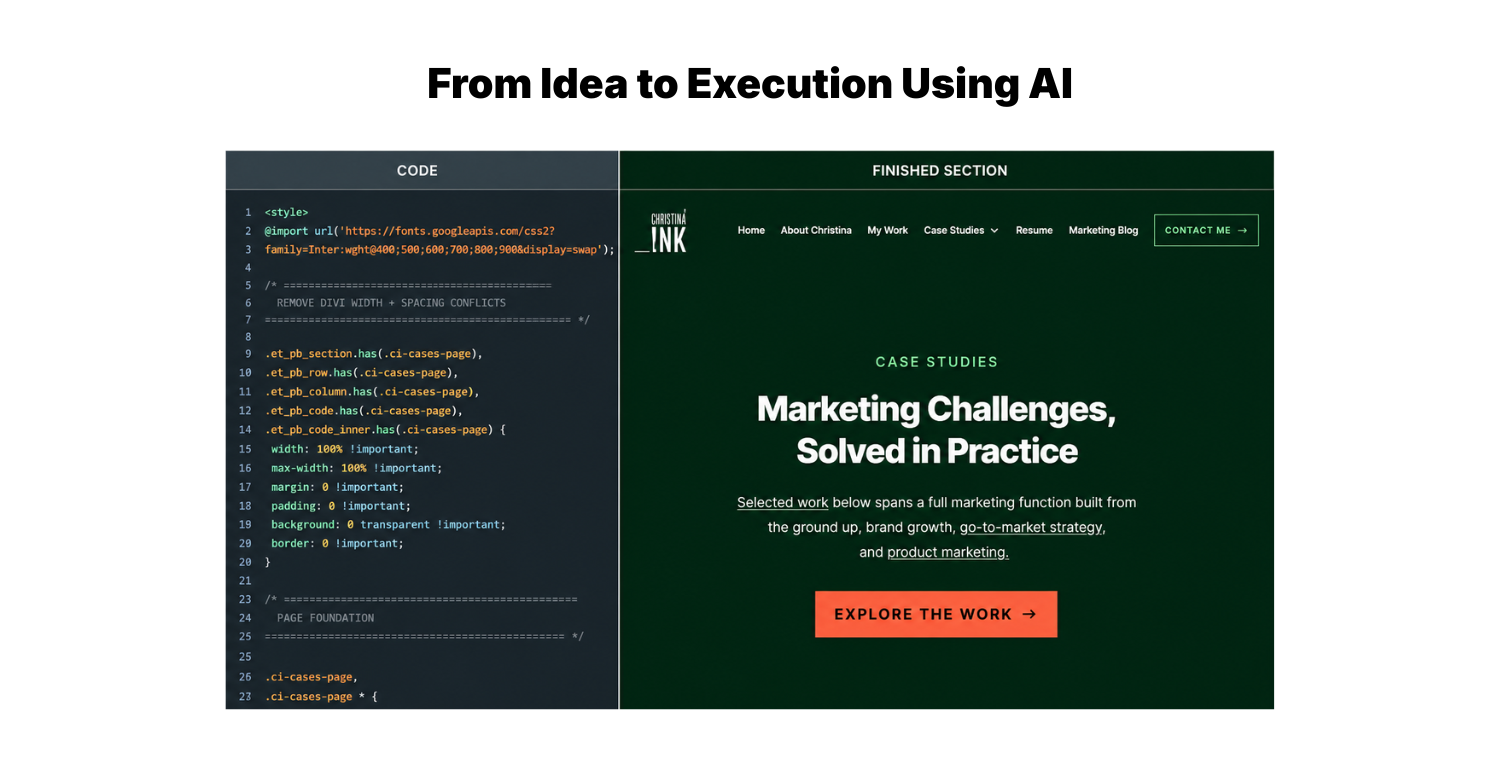
I built custom sections and functionality for Christina Ink that I could visualize and direct but couldn’t have coded from scratch myself.

Instead of being limited by what I could build inside WordPress and Divi, I could describe what I wanted, generate the code, test it on the site, identify what wasn’t working, and keep refining it until the result matched what I had in mind.

Custom Christina Ink website section alongside the code used to build it

That process still required judgment. AI regularly gave me code that technically worked but didn’t look right, behaved strangely on mobile, or solved the problem in a way I didn’t want. I had to be specific about what needed to change and test the output on the actual website rather than assuming functional code meant finished work.

But the difference in what I could execute was huge.

The same thing happened in areas where I already had more expertise. I could bring AI a section of copy that wasn’t working and pressure test different approaches without rewriting every version from scratch.

I could investigate a technical SEO issue as soon as I found it, work through what Google Search Console was reporting, and understand what I needed to check before making a change.

I didn’t suddenly become a developer, designer, or technical SEO specialist. What changed was how far I could go without one.

Where AI Made the Work Worse

The biggest problem I ran into was that AI almost always had another idea.

Another section I could add. Another keyword I could target. Another way to structure a page. Another feature I could build. Another paragraph explaining something I had already explained.

A lot of those suggestions were reasonable on their own, but together, they could make the website worse and drain hours of a content marketer’s time and budget.

I saw it in the design work when technically polished ideas started looking like generic templates. I saw it in the copy when a clear point became five paragraphs because there was always more context available. I saw it in SEO when finding another related keyword made it tempting to create content the site didn’t actually need.

Code had its own version of the same problem. Just because I could suddenly build a more complicated interaction, animation, or custom section didn’t mean it improved the user experience. Sometimes the better decision was to simplify what I had already built or not build the feature at all.

I’ve even run into the problem while writing this article.

There have been several points where AI suggested another section that made sense in isolation, but when I looked at the article as a whole, I had already answered the question somewhere else. Adding it would have made the article longer without making it more useful.

AI is very good at answering What else could I do

It is much less reliable at answering Have I already done enough

What I Learned About Using AI for Website Content Strategy

The biggest change AI made to my website content strategy wasn’t giving me the strategy. It expanded what I could realistically execute once I had one.

I still needed to decide what Christina Ink was supposed to accomplish, who I wanted to reach, what I wanted to be known for, which work deserved attention, and which search opportunities were worth pursuing.

AI could help me explore more options, challenge my thinking, work through unfamiliar technical problems, and execute ideas that might previously have required several different specialists.

But that additional capability came with a new responsibility. I had to get better at separating what was possible from what was useful.

The process that worked best for me was:

I set the objective → AI expanded the possibilities → I decided what was worth using → AI helped me execute → I evaluated the result against the original objective

The website content strategy was still mine.

How I’ll Measure Whether My Website Content Strategy Worked

The site is live, but the rebuild isn’t finished.

Measuring website content strategy means looking beyond total traffic to see whether the right people are finding the right content and doing what the strategy was built to help them do.

That’s especially important for Christina Ink because I deliberately walked away from content and search visibility tied to my old Amazon business. More traffic won’t necessarily mean the new strategy is working. I want to see whether I’m gaining visibility for the topics and expertise I actually want the site associated with now.

What I’ll Measure in Google Search Console

Google Search Console gives me a baseline for watching that shift happen.

I’ll be looking at which queries generate impressions, which pages begin ranking, how average positions change, and whether organic clicks grow as the new content has more time to be crawled and indexed.

I’m particularly interested in the queries.

If impressions grow but they’re still overwhelmingly tied to topics I no longer prioritize, that’s very different from seeing Christina Ink begin appearing for searches related to website content strategy, content marketing, SEO, AEO, and the other areas I’m intentionally building around.

The goal is visibility for the expertise I actually want Christina Ink associated with.

What I’ll Measure on the Website

Search performance only tells me how people arrive; I also want to know what happens once they’re here.

If someone lands on an article, do they explore related work? If they visit My Work, do they open a case study? Which projects get attention?

Are people finding the deeper proof I deliberately built into the site, or are important pages being ignored?

Those behaviours can tell me whether the architecture that made sense on paper actually makes sense to the people using it.

I’ll also watch the actions closest to the site’s actual goals, including resume views, contact activity, and movement into the portfolio and case studies.

A ranking is useful. A ranking that brings the right person into the site and gives them a reason to keep exploring is much more useful.

What Would Make Me Change the Strategy

I don’t expect every decision I made during the rebuild to be right.

If an article earns impressions but very few clicks, I can look at its position, search intent, title, and what else is competing in the SERP. If people reach My Work but rarely open a case study, I can look at how those projects are presented and whether I’m giving someone enough reason to go deeper.

I can also watch whether the broader repositioning is actually happening in search.

If Google continues associating Christina Ink primarily with topics I’m moving away from while the areas I’m deliberately building around gain little traction, that’s information I can act on.

I rebuilt the site based on what I believe Christina Ink needs to do now. The next part of the website content strategy is watching what happens and being willing to change the parts that don’t work.

A Better Website Starts With Clear Decisions 

If you’re looking at your own website and wondering what to improve, resist the urge to start with what you could add.

Start with what your website needs to do.

Look at what people are coming to find, what you need them to understand, what already deserves their attention, and where the experience is making any of that harder than it needs to be.

Use AI to explore ideas you couldn’t execute before. Use search data to find opportunities you might have missed. Test new structures.

Build something custom and avoid the AI sameness trap. Rewrite that page that isn’t working. Learn enough about the technical pieces to ask better questions and make better decisions.


But don’t mistake having more options for needing more content.

Want to see what those decisions looked like in practice? [See how I rebuilt Christina Ink from the ground up.]


More From Christina

More Marketing Strategy, Minus the Fluff

Explore more articles on marketing strategy, content, SEO, AEO, AI, and the systems behind stronger marketing.