
How to Build an AI Content Workflow for a One-Person Marketing Team
Table of Contents
- What Is an AI Content Workflow
- Start by Finding Where Your Marketing Time Goes
- Build Your AI Content Workflow Around Context
- A Practical AI Content Workflow for a One-Person Marketing Team
- Use AI Where It Creates the Most Content Capacity
- Know When a Prompt Should Become a System
- Protect the Marketing Work That Is Worth Your Time
- Measure Your AI Content Workflow in Time and Money
- Frequently Asked Questions
If you’re a marketer, chances are you’ve been a one-person department for longer than you can remember.
Early in your career, you probably figured that was just a rite of passage. Then you climbed the ladder and realized nothing changed.
You were still flying solo between research, strategy, execution, optimization, and reporting, just with a bigger title attached to it.
There are still campaigns to plan, blogs to write, emails to send, social channels to feed, keywords to research, and stakeholders who need something by Friday.
A larger team would split that across a content strategist, SEO specialist, writer, designer, and marketing ops person. When you are the team, all of those jobs land on your desk anyway.
And sure, hiring more people seems like the obvious next move. But your time is lean, your budget is leaner, and right now your focus is proving marketing is working before you can even make that case.
That is where an AI content workflow earns its keep because it increases how much good work you can execute with the people, hours, and budget you already have.
For a one-person marketing team, that isn’t some random productivity hack. It’s a legit way to create real capacity that wouldn’t otherwise exist.
What Is an AI Content Workflow
An AI content workflow is a repeatable process that uses artificial intelligence at specific stages of planning, creating, optimizing, distributing, and managing content.
The important word is workflow.
Opening ChatGPT when you need ten headline ideas is using AI. Asking Claude to clean up an email is using AI. But neither automatically gives you an AI content workflow.
A workflow determines how the work moves from one stage to the next, what information travels with it, where AI is useful, and where a person still needs to make the call.
A simple AI content creation workflow might look like this:
Research → Brief → Outline → Draft → Human Edit → SEO Review → Distribution → Measurement
Research might begin with an AI research tool before moving into a project that already contains your audience, brand, and campaign context. An approved article might become the source material for an email and social post. Reusable instructions might apply the same editorial standards every time you review a draft. An agent might handle a defined research or analysis process with checkpoints built in.
The point is to build a process where each part earns its place by answering one practical question:
Does this give me enough time, capability, or budget back to make it worth using?
If building an automation takes four hours to save five minutes once a month, it probably doesn’t give you more time, or capability.
But if spending an hour building a reusable system saves two hours every week, the calculation changes, and quickly.
That’s the lens I use for deciding where AI belongs.
Start by Finding Where Your Marketing Time Goes
Before adding another AI tool, look at the work consuming your week.
The best opportunity is not necessarily the task you dislike the most. It is the work where the combination of frequency, time, and AI capability creates a meaningful return.
Take a recurring marketing campaign.
The job is rarely just writing a landing page or scheduling a few social posts. It can include audience research, positioning, campaign planning, keyword research, landing-page copy, email, social, creative direction, paid media, reporting, and whatever last-minute request appears halfway through the week.
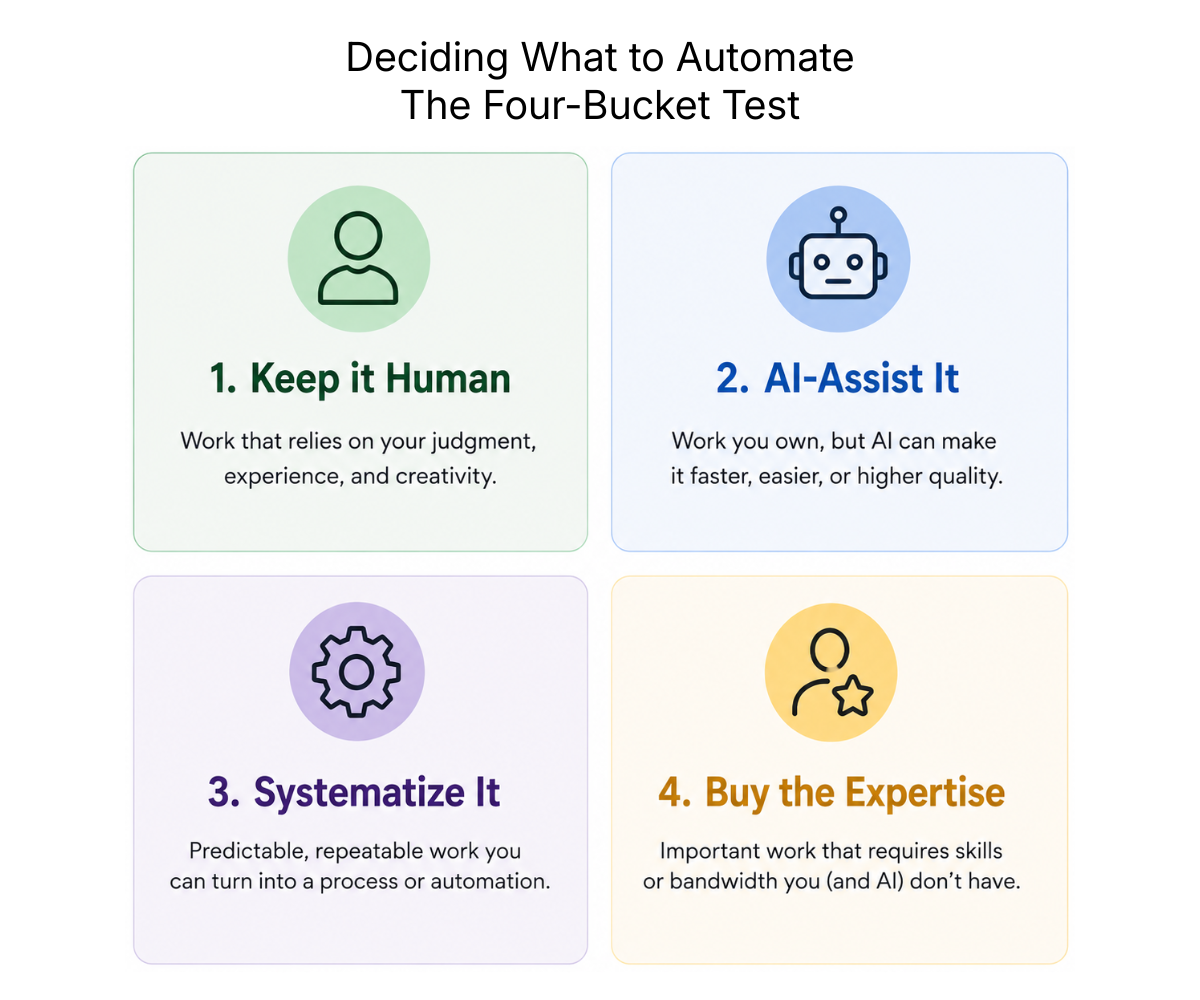
Making any one of those tasks faster solves only one piece of the problem. Instead, map the entire process and put each task into one of four buckets.
1. Keep it human: The work depends heavily on your experience, business knowledge, relationships, taste, or judgment.
2. AI-assist it: You still own the task, but AI can reduce the time required to research, compare, organize, analyze, draft, or review.
3. Systematize or automate it: The task happens frequently enough and follows predictable enough rules that reusable instructions, a Project, Skill, custom GPT, agent, integration, or automation can handle a meaningful portion of it.
4. Buy the expertise: The work matters, but neither you nor AI can perform it to the required standard. This is where a freelancer, contractor, or agency can create more value than another software subscription.
The bucket test keeps AI adoption from becoming its own job and it also helps you find places where a limited investment can create usable capacity.
Build Your AI Content Workflow Around Context
One of the easiest ways to waste time with AI is to make it rediscover your business every time you use it.
You open a new conversation and explain the audience, then the brand. Then you start hashing out your style requirements, tone of voice, and then finally you begin ironing out the actual campaign. Three days later, you’re frustrated by the amount of rework and have red lined your own work so many times you can’t see straight.
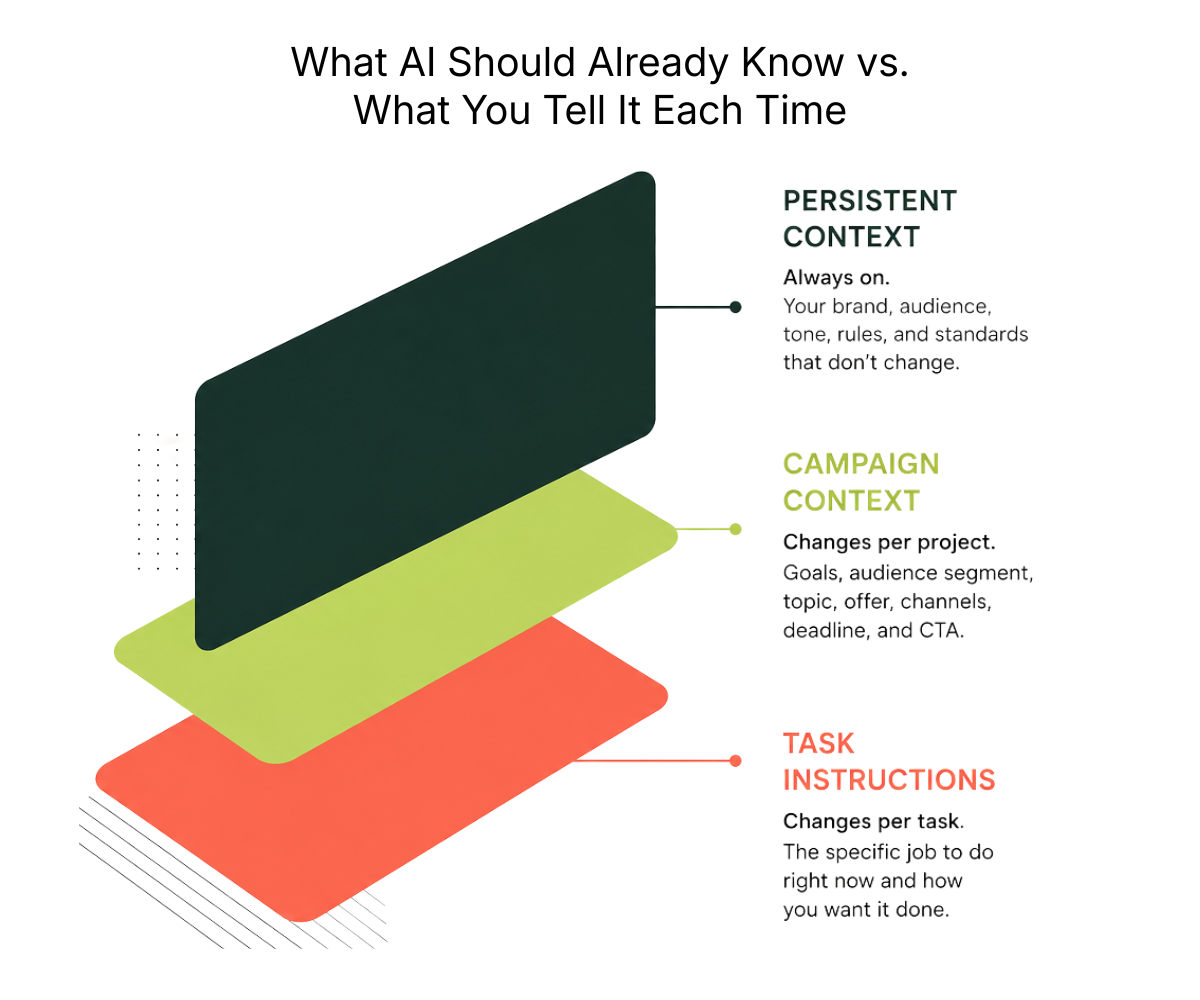
A better AI workflow separates context that should persist from context that changes with the work.
Persistent Context
Persistent content is information AI shouldn’t need you to explain from scratch every single time.
It might include your brand positioning, ideal customer profile, products and services, voice guidelines, editorial standards, approved examples, SEO requirements, messaging rules, claims that require evidence, and common mistakes you want AI to avoid.
Campaign Context
This part changes from project to project, but campaign context might include the objective, offer, target segment, keyword or topic, source material, deadline, channels, CTA, and campaign-specific messaging.
Task Instructions
These tell AI what needs to happen right now.
For example, you might ask it to compare five competing pages and identify gaps your article can address without just reproducing their structure.
Or you might have it review a finished draft against your editorial guidelines and flag repetitive arguments, unsupported claims, weak transitions, and sections that don’t help satisfy search intent.
Today’s AI platforms give marketers several ways to preserve and reuse that context, including Projects, custom instructions, custom GPTs, Claude Skills, knowledge files, and agent configurations.
Anthropic, for example, describes Agent Skills as a way of packaging instructions, resources, and procedural knowledge that Claude can use for particular tasks.
And no, you do not actually need all of them. Choose the lightest system that reliably handles the job.
If a saved prompt works, use the saved prompt. If you constantly have to re-explain the same requirements, move that information into persistent context. If a task requires several predictable steps and happens frequently, it may be worth creating a reusable system around it.
If information constantly has to be copied from one system into another, automation starts becoming more attractive.
The technology should get more sophisticated only when the work actually justifies it. As marketers we want to touch everything, build the fancy system, add the extra tool. But half the time, that urge is exactly what’s slowing you down
A Practical AI Content Workflow for a One-Person Marketing Team

There is no single workflow every marketer should copy. Your process should reflect what you produce. But a campaign gives us a useful example because it touches several parts of marketing at once.
Say you need to launch an offer. You have an audience to understand, messaging to figure out, a landing page to build, email and social to create, maybe paid media to support it, and results somebody is eventually going to ask you to explain.
Sounds familiar? Here is how I would think about the workflow.
1. Research the Opportunity
Do not start by asking AI to build the campaign. Start by deciding whether the opportunity is worth pursuing.
Use customer questions, sales conversations, previous campaign performance, Search Console data, competitor positioning, market research, and business priorities to understand what you are working with. Sounds like a lot, right? AI cuts this part down so you’re not spinning your wheels, but you still need to bring sharp judgment before you start.
AI can help compare competitors, summarize customer research, organize performance data, surface recurring questions, analyze search results, and identify patterns across information that would take much longer to review manually.
The human decision is whether the opportunity is worth pursuing and what your contribution to it will be.
That last part matters more as AI makes generic marketing increasingly cheap to produce. It’s also one of the lessons I learned while rebuilding my own website content strategy.
AI can make execution dramatically easier, but it can’t decide which work actually deserves to exist.
Google’s current guidance for generative AI search makes the same broader point from a search perspective. The fundamentals still come back to producing useful, original information rather than finding a shortcut around the thinking.
2. Create the Brief
Turn the research into a clear job for the campaign. At minimum, define who it is for, what they need to understand, the angle, the offer, the business objective, important evidence or source material, the channels involved, and the action you want the audience to take.
AI can assemble the first version of the brief, but this is one of the places I would keep human approval.
This is also where AI sameness often starts. If the audience insight, angle, positioning, and point of view are generated entirely by AI, the finished campaign has very little chance of becoming more distinctive as it moves through an automated workflow. The output can only work with the intent and context you put into the system.
A beautifully automated production workflow will still produce mediocre marketing if the brief gives it nothing interesting to say.
3. Build and Pressure-Test the Campaign
Use the brief and research to decide what the campaign actually needs, then challenge it.
Does the offer need a landing page? Email sequence? Paid search? Organic social? Supporting content? Sales enablement?
Does every asset have a job? Are the channels reinforcing the same idea? Is something there because the campaign actually needs it or because your content calendar happens to have an empty box?
AI is particularly useful here because it can map requirements, compare channel needs, identify messaging gaps, and pressure-test whether the pieces support the same objective.
But the final campaign structure is still a marketing decision.
4. Produce the First Versions
Once the strategy, source material, and campaign structure are established, AI can remove substantial production time from execution.
That doesn’t mean opening five separate conversations and asking it to write an email, then an ad, then a LinkedIn post.
Give it the material you have already approved.
The campaign brief can feed the landing-page copy. The approved messaging can inform email. The same positioning can feed paid-media concepts, social creative, sales assets, and supporting content without recreating the campaign logic every time.
Useful inputs might include the brief, research, source material, brand context, approved messaging, previous campaigns, and channel-specific requirements.
The more important the campaign is, the less I want the model filling gaps with its own assumptions.
5. Edit for What AI Cannot Reliably Judge
This is where I spend the human time the workflow has saved. I am looking for things like:
- Is the offer actually compelling?
- Does this sound like something we would say?
- Does the message fit what the audience cares about?
- Are the channels reinforcing the same idea?
- Did AI smooth away what made the concept interesting?
- Are we making claims the evidence does not support?
- Is something here because the campaign needs it or because it looks like marketing?
- Does the CTA make sense for this audience at this point?
AI can assist with editing. It can compare assets against the brief, identify inconsistencies, catch repetition, flag unsupported statements, and pressure-test whether the campaign has drifted away from its original objective.
But I would never outsource the final marketing decision. A campaign can be perfectly polished and still be the wrong campaign.
6. Optimize for the Channel
Optimization should not suddenly appear after everything is finished.
Audience intent, positioning, channel requirements, source material, and differentiation should already have shaped the work.
The final optimization pass is where you check the execution.
For search content, that might include search intent, internal links, metadata, crawlability, and on-page SEO.
For email, it might mean subject lines, sequence logic, segmentation, and CTA placement.
For paid media, it might mean message match between the ad and landing page, creative variations, audience segments, and testing hypotheses.
For social, it might mean adapting the idea to the platform instead of pasting the same copy everywhere.
AI can help with all of those things. What it should not do is turn channel optimization into five completely different campaigns.
The strategy should still travel with the work.
That same principle shaped my website content strategy and SEO rebuild, where the job was not simply rewriting pages. It meant deciding what to keep, consolidate, remove, restructure, and connect across the site.
Google’s guidance for AI features in Search also makes it clear that AI-powered search does not require some completely separate SEO playbook. Internal linking, crawlability, useful content, and the same core fundamentals still matter.
7. Systematize the Handoffs
Once the campaign starts moving, look for places where you are repeatedly copying, formatting, explaining, or checking the same information.
Maybe the approved campaign brief lives in a Project that already contains your persistent brand context.
Maybe a reusable Skill checks every landing page or email against the same requirements.
Maybe approved campaign messaging becomes the input for social, paid media, or sales assets.
Maybe campaign data is automatically pulled into one place before AI summarizes what changed.
This is where a one-person team can gain enormous capacity because you are not rebuilding context from zero at every handoff.
But I would put a big asterisk beside the word automate. Automating a step that barely costs you any time is not automatically efficient.
Systematize the work where repetition is actually costing you something.
I have used that broader approach across growth marketing projects where the work extends beyond a single asset and into the channels needed to support the larger objective.
8. Measure Whether the Workflow Earned Its Place
Once the campaign is live, close the loop.
First, look at whether the marketing worked. Did it generate leads? Improve conversion? Increase visibility? Drive engagement? Produce revenue? Whatever the campaign was actually built to influence.
Then look at the workflow itself.
How long did the work take? Where did AI genuinely save time? Where did it create rework? Which parts should become reusable? Which parts should stay manual?
Then change the system. If AI consistently creates weak first versions of something, stop forcing it into that part of the workflow.
Or if your research or reporting process saves three hours every week, strengthen it.
Your AI content workflow should get better because you use it.
Use AI Where It Creates the Most Content Capacity
Research is one of the most obvious opportunities.
Instead of opening twenty tabs, reviewing customer notes separately, pulling campaign numbers into another document, and manually trying to connect the dots, AI-assisted research can help compare information, summarize large amounts of material, surface patterns, and organize what deserves your attention.
You still need to evaluate the quality of those sources and decide what the information actually means.
But you are no longer spending the same amount of time getting from zero to something worth evaluating. The same principle applies to reporting.
A one-person marketer can lose hours pulling numbers, formatting updates, comparing periods, and explaining what changed. AI can help organize the data and produce the first analysis so your time goes toward figuring out why something happened and what to do next.
Then there is production. Once you have done the expensive thinking behind a campaign, that work should travel. A strong brief can inform the landing page. The landing page can inform email. The same campaign strategy can feed paid media, social, sales enablement, and supporting content.
This is where a one-person team can gain enormous capacity. (Maybe don’t tell the higher-ups, if you’re worried about looking too efficient.)
You aren’t asking AI to invent ten unrelated pieces because the content calendar has ten empty boxes. You’re finally using work you have already done to reduce the cost of producing the next useful piece of marketing.
And more output isn’t automatically the objective.
If AI saves three hours and you use those three hours to improve a campaign, analyze performance, talk to customers, fix a conversion problem, or finally tackle the strategic work that has been sitting on your list for two months, the workflow still succeeded.
You got capacity back.
Know When a Prompt Should Become a System
Not every AI task needs an agent, but some absolutely benefit from becoming more systematic.
Look for Recurrence Plus Predictability
The dividing line I find useful is recurrence plus predictability. If you perform the same task repeatedly and find yourself giving AI essentially the same instructions every time, you have found a reasonable candidate.
What This Looks Like
Say every article needs to be checked against the same requirements. It has to satisfy search intent, use full sentences, avoid repetitive arguments, maintain your brand voice, verify important claims, follow specific language rules, and end with an appropriate CTA.
You could paste all of those instructions into a new conversation every week. Or you could build them into something the AI knows to check every time, without you re-explaining it.
This is what tools like Claude Skills are actually for. Instead of retyping your editorial rules into a fresh chat, you build them once into a reusable set of instructions the AI reads automatically whenever you hand it a draft.
But content is only one example.
Maybe every month you pull the same campaign metrics, compare them against the previous period, identify the biggest changes, and prepare a performance summary for leadership. If you are giving AI essentially the same instructions every time, that reporting workflow may be an even better candidate for systematization.
The same logic applies to content research, brief creation, editorial reviews, social adaptation, creative briefs, reporting summaries, campaign analysis, content refreshes, and competitor monitoring. Anywhere you are repeating the same instructions is a candidate.
When It’s Worth Building an Agent Instead
Agents become more interesting when the work itself contains several connected steps. Instead of asking for one output, you can give the agent a defined objective, information it can access, rules it must follow, and checkpoints where you still want human approval.
But sophistication doesn’t automatically create efficiency.
Before You Build Anything, Ask
- How often do I do this?
- How much time does it currently take?
- How much of that time could the system realistically remove?
- How long will it take to build, test, and maintain?
A workflow that saves 30 minutes every working day can give you roughly 130 hours back over a year. A complicated agent you spend an afternoon building for something you do quarterly might never pay you back.
Build for the work you actually have.
Protect the Marketing Work That Is Worth Your Time
Creating capacity only matters if you are deliberate about what you do with it.
There are parts of marketing I would be reluctant to hand over simply because AI can produce an answer.
Positioning is one. AI can challenge your positioning, compare alternatives, identify weaknesses, and help you think through the implications of a choice.
Deciding what the company should stand for is different. The same applies to understanding an audience.
AI can organize customer research and surface patterns. It cannot replace actually knowing the customers, hearing objections, understanding the politics inside a business, or recognizing that something technically correct will land badly with the people who need to hear it.
The same goes for deciding where to spend budget, which opportunity deserves attention, when a campaign needs to change direction, or whether the data is telling you something meaningful instead of just producing more noise.
Editorial judgment matters for the same reason, and a real person has to recognize that.
Quality control also becomes more important as the production process accelerates. A faster workflow can produce bad information faster too.
Google’s guidance on using generative AI content recommends focusing on accuracy, quality, relevance, and added value. It also warns that producing large numbers of pages without providing value can run into its scaled content abuse policies.
Human checkpoints aren’t actually evidence that your AI content workflow failed to automate enough.
They are where you deliberately spend the expertise the workflow freed up.
Measure Your AI Content Workflow in Time and Money
AI workflows are easy to judge by output.
We published twice as much.
We created 30 social posts.
We produced an article in 20 minutes.
Those numbers sound impressive, but they don’t tell you whether the workflow improved your marketing. For a one-person team, I would start with a more practical question:
What did this give back?
Track how long a recurring content process took before the workflow and how long it takes now.
Include review and correction time. A 10-minute AI draft that requires two hours of rewriting is not a 10-minute article.
Then look at cost by adding up your AI subscriptions, automation tools, freelancer support, and other resources required to run the process. Compare that with the workload they allow you to handle and what equivalent outside support would realistically cost.
Then look at the actual marketing results. Did organic traffic improve? Did the campaign generate leads? Did email engagement move? Did sales use the content? Did the landing page convert better? Did the content start appearing for more of the searches you built it to answer?
Time saved without useful marketing outcomes is just a faster way to make things nobody needed.
A simple monthly scorecard can keep the workflow grounded.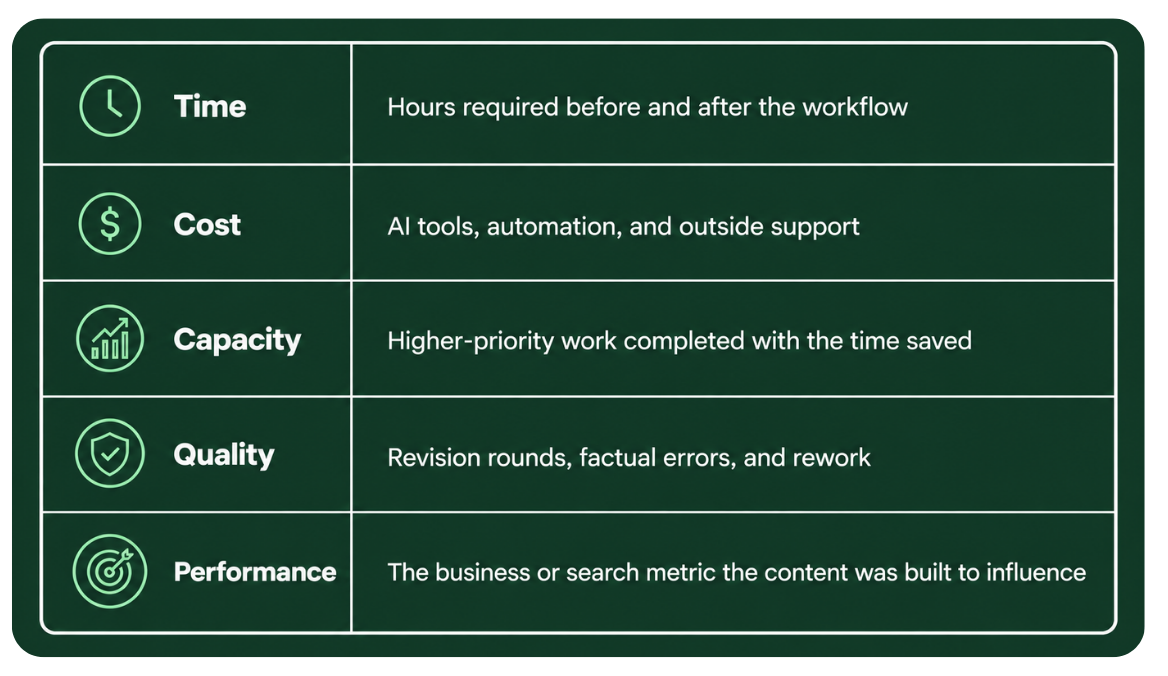
You don’t need perfect attribution to know whether the system is earning its keep. Yes, I said what I said. What you actually need as a one-person ‘department’ is enough evidence to decide what to keep, improve, remove, or invest in next.
That balance between execution and measurable business impact is what I focus on throughout my marketing case studies and portfolio.
What the Best AI Content Workflow Looks Like
For a one-person marketing team, the best AI content workflow is usually the one where AI handles repeatable work, systems preserve context you should not have to explain twice, automation removes predictable handoffs, human judgment stays attached to decisions that matter, outside specialists fill capability gaps AI cannot, and performance data determines what the workflow becomes next.
I know that’s much less exciting answer than building an army of agents, but it’s also much more useful.
A one-person marketing team will always have constraints.
There are only so many hours in a week. The budget will force choices. There will always be another campaign, channel, idea, request, or opportunity competing for attention.
AI doesn’t remove those constraints; it changes what you can accomplish inside them.
Use a prompt when a prompt is enough. Build a reusable system when the same work keeps coming back. Automate the predictable parts. Use agents when the complexity earns them. Pay for human expertise when expertise is actually what the job requires.
Then keep the time you recover for the work where you can make the biggest difference.
Because when you are the entire marketing team, getting time back is not about doing less marketing. It is how you finally get enough room to do the marketing that matters.
You can explore my marketing work and case studies or read more about content strategy, SEO, and modern marketing.
I Build This Stuff, I Don’t Just Write About It
This AI content workflow is the same approach I’ve used to run marketing as a department of one, from research and strategy through execution and reporting, without losing the judgment that makes the work actually good.
If you want to see what that looks like in practice, my portfolio walks through the campaigns and results behind it.
Because at the end of the day, the workflow isn’t the point. It’s what you build with the time it gives back.
Frequently Asked Questions
What is an AI content workflow
An AI content workflow is a repeatable process that uses AI at specific stages of planning, creating, optimizing, and distributing content, rather than using AI as a single one-off tool. It defines where AI helps, where a human still makes the call, and how information moves between each stage.
How do solo marketers use AI without losing quality
Solo marketers protect quality by keeping AI out of the decisions that depend on judgment, like positioning, audience insight, and final editorial calls, while letting it handle research, drafting, and repetitive review work. The workflow only works if a human still owns the parts that require actual expertise.
What should you not automate with AI in marketing
Keep positioning, audience understanding, final editorial judgment, and anything that depends on business context or relationships human led. AI can support those decisions with research and analysis, but it should not make them.
Do you need AI agents to build a content workflow
No. A working AI content workflow can start with a strong prompt, good source material, and persistent brand context. Agents only become worth building when a task involves several connected steps, follows predictable rules, and happens often enough to justify the setup time.
How much time can AI actually save a one-person marketing team
The time saved depends on how often a task repeats and how predictable it is, not on how sophisticated the AI tool is. A workflow that saves even 30 minutes a day adds up to roughly 130 hours back over a year, which is real capacity for a team of one.